Our goal for this page is to prepare the unordered list before we begin styling the list item links to look like buttons. By default, a list has bullets at the beginning of each item and some amount of surrounding margins and padding. We will eliminate these formats so our list will sit tight against the left edge of the containing DIV.
It is important to remove all padding and margins from the navigation list before we start styling our buttons partly because of the wide variance in default list formatting among browsers. Once these default list styles are removed, we can then apply the "button" styling we need to the links within the lists.
Zeroing Padding and Margins
The list-style-type property controls whether and how markers (bullets) are displayed. We will set this value to none. We will also set zero values for the list margins
and padding.
- Add the following UL rule to your style sheet.
div#sidebar ul {
  margin: 0;
  padding: 0;
  list-style-type: none;
  }
The list is now tight against the left edge of the containing DIV and displays no markers.
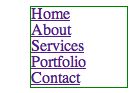
We are ready to style the navigation links.