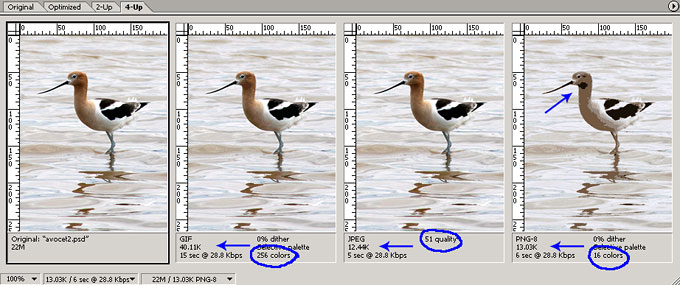
In the image below, I show an example of a photo where the JPG file type has a clear advantage over the GIF and PNG images. The GIF image looks nearly as good as the JPG (at this small size) but the file size of the GIF is nearly 3-1/2 times larger! I could probably reduce the JPG quality even more than I did in this demo.
Since the GIF and PNG files behave almost the same in this instance, I opted to use the PNG image to show what the image looks like when I attempt to match the low file size of the JPG image. The PNG has to be pulled down to 16 colors to come close to the JPG file size. This makes the bird's head and neck a very dull color and subtle shading turns into obvious blocks of contrasting color.
The image on the left is the original Photoshop image.
- GIF - Second Image
- 40.11K file size
- 256 colors
- JPG - Third Image
- 12.49K file size
- 51 quality
- PNG - Fourth Image
- 13.03K file size
- 16 colors