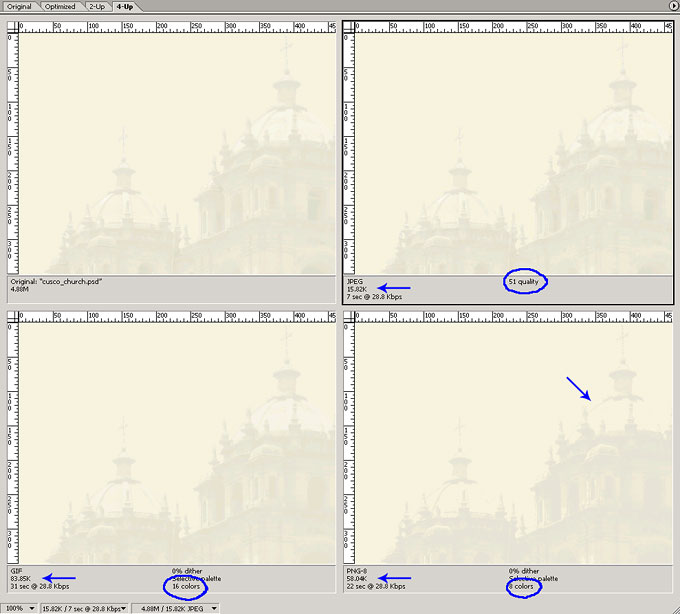
In the image below, I show an example of a background photo that has been faded in addition to using a color overlay. The JPG file type wins this one too. Compared to the previous bird photo, this image has much larger physical dimensions - 600x640px (not all of it shows) vs. the bird which is 200x265px - but it has a file size that is almost the same! This points out how a JPG's file size is directly related to the number of colors present. When the image is 'washed out' as it is here, the reduced number of colors greatly benefits the file size. Indeed, a faded image often works better for a background anyway since it doesn't compete with text or other objects that may be placed on top of it.
Even with the reduced number of colors in this photo, the JPG still wins over the GIF and PNG images. Again, since the GIF and PNG files were very similar, I used the PNG image to attempt reducing the file size to get close to the JPG file size, but at 8 colors I lost the dome of the church and it's still more than 3 times the file size. The GIF image is nearly 5 1/2 times the JPG file size!
The original Photoshop file is on the upper left.
- JPG - Upper Right
- 15.82K file size
- 51 quality
- GIF - Lower Left
- 83.85K file size
- 16 colors
- PNG - Lower Right
- 50.04K file size
- 8 colors