In the image below, I show an example of a computer generated graphic image where the GIF or PNG file types have a clear benefit over the JPG image. In this experiment I made the file sizes as close to each other as possible.
The GIF and PNG files, both set at 32 colors, are very similar in quality. The GIF file size is just a tiny bit smaller in this instance. But the JPG image, on the other hand, is somewhat fuzzy and dull at a quality of 17. That's 17 on a scale from 1 to 100! That is how low I had to set the JPG image to get it close to the file sizes of the GIF and PNG files for this graphic image.
The image in the upper left corner is the original Photoshop file.
- GIF - Top Right
- 3.618K file size
- 32 colors
- JPG - Bottom Left
- 3.53K file size
- 17 quality
- PNG - Bottom Right
- 3.652K file size
- 32 colors
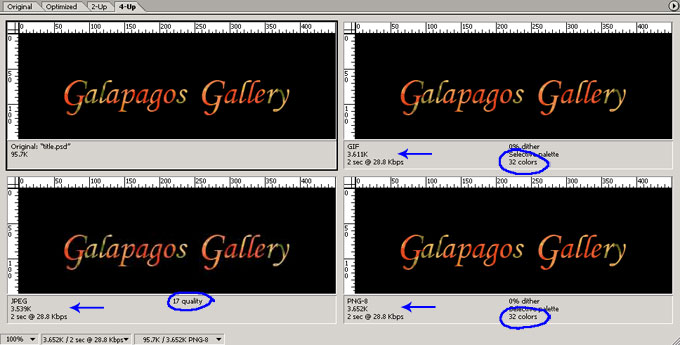
Depending on your monitor, it may be a bit difficult to discern the differences between the images since this image of the images had to be reduced in size and then saved as a JPG file to be uploaded to the web. This JPG image of the images is a fairly large file at 51K (image quality: 60).